PamFax on Mac OS X - the perfect solution for your Mac
You can send faxes from your Mac right now - with PamFax
There is
- NO hardware
- NO minimum monthly purchase
- NO advertising
- NO hidden costs
- NO monthly costs to send faxes
Just install PamFax and start sending faxes immediately using PayPal or your credit card to add PamFax credits to your PamFax account.
This ist just a small overview of all PamFax features. The program itself has a lot more features of which explaining in detail would take hours.
Just install and try for yourself, it's easy.
Selecting files
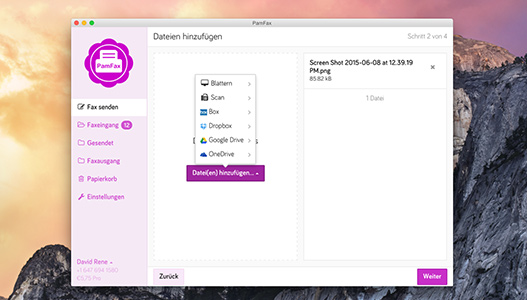
PamFax offers an easy way to select the files you want to send as fax.
A lot of file types are supported (like *.doc, *.xls, ...). PamFax even supports Microsoft Office 2007 document formats.
You can choose multiple files (even mixed file types) for one fax. All files are merged into one fax.
Entering recipients
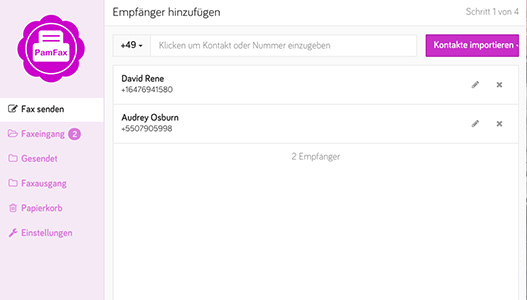
You may send faxes to one or multiple recipients.
You can easily choose from the last 10 recipients.
Multiple recipients
Even sending to a list of recipients is very easy with PamFax: just copy and paste any list of recipients into the multiple-recipients-list of PamFax.
Showing recipients in Google Maps
To see where the recipient of the fax is located, you can open Google Maps directly from PamFax.
Selecting a cover page
PamFax can add a cover page to your fax containing sender, recipient and other data.
If you choose to add a cover page, you may enter a message, too. Even sending only a cover page with a message is possible.
Setting up notifications
PamFax will notify you about the fax sending progress.
You may choose from various options like Skype Chat, SMS and/or E-Mail.
Payment
Just buy some PamFax Credit in advance so that you don't have to go through the order process when you want to send a fax.
You send your fax with just a few clicks if you have enough PamFax Credit.
To save money you can buy PamFax pre-paid packs, which give you more PamFax Credit than you pay. For example, if you buy the 100 Euro Credit Pack, you will get 115 Euro added to your PamFax Credit immediately after you purchased.
This lets you send up to 1.222 fax pages to recipients in zone 1 (see rates page).
You can also subscribe to the PamFax Professional Plan which gives you a discount on page prices for faxes you send and also includes a personal fax number to receive faxes. Receiving faxes is free: there is no charge per page for incoming faxes.
Portal
All faxes are listed in your personal PamFax Portal. In the Portal, you can see the status of the fax and you can also open the fax from there. All faxes are stored for 30 days by default, but can also be deleted from the Portal.
The Portal also allows you to resend a fax, buy PamFax Credit and open/manage your PamFax Business Control Panel.
The Portal also offers more tools for PamFax, like the integration into Facebook, Salesforce or the Windows Vista Sidebar.
Internationalization
PamFax is available in many different languages.
PamFax takes the language of your Skype or your current location's language automatically.
You can also choose the time zone and language you want the software to be in (Portal -> Settings -> Localization).
Different currencies are also supported. Internally, PamFax calculates all prices in EUR. The currency rate for your currency is refreshed multiple times per day. You can also set the currency in your Portal.